



A New Digital Banking Experience Is Coming Soon
Get Ready for Exciting Updates on November 11th!
We’re upgrading to a new digital banking platform on November 11, 2026, which means a modern look, expanded functionality, stronger security and fraud protection, and more.
Below you’ll find answers to common questions to make the transition as smooth as possible. There may be some actions needed from our members, so we’ve built reference guides to help you be fully prepared.
We’ll continue updating this page, so be sure to check back for the latest information. Our Member Care team is also available to assist you.
Thank you for your patience and continued support.
Reference Guides
-
Digital Banking
-
Bill Pay
-
Zelle
-
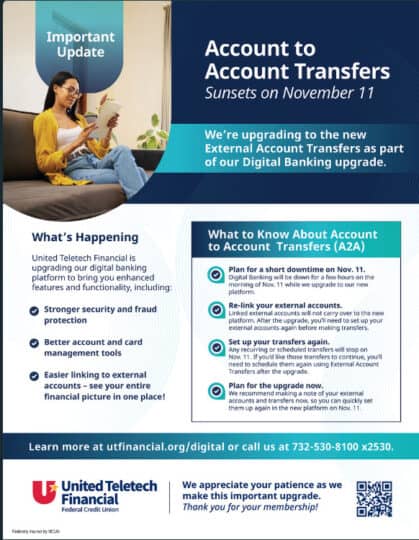
Account to Account (A2A) Transfers
-
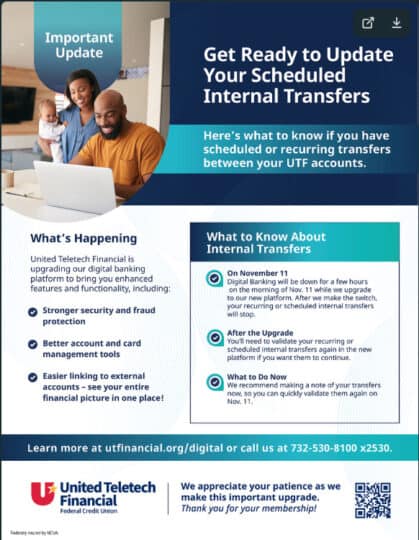
Scheduled Internal Transfers
FAQs
Our current digital banking experience no longer meets modern standards. We’re investing in new technology to grow and provide improved functionality, convenience, and security for our members.
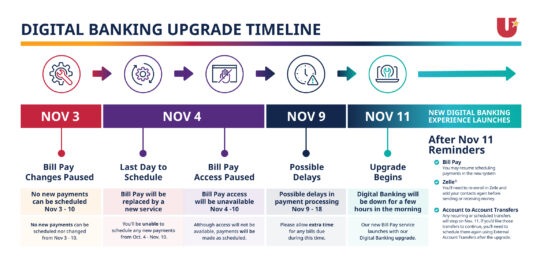
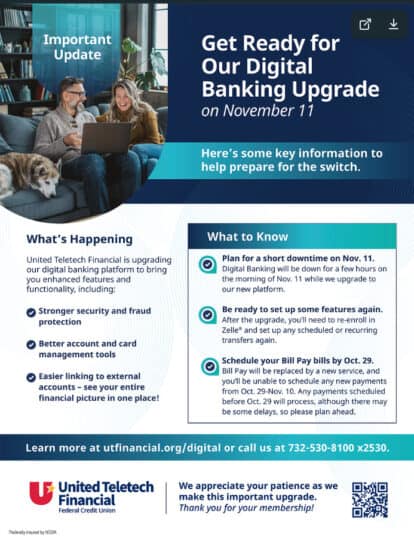
The switch will happen on November 11, 2026.
There may be a brief period during the transition when online and mobile banking services are unavailable. We will provide additional details and advance notice closer to launch. Branches and phone support will be available during regular hours as usual.
- Your username will stay the same
- Account numbers, account names, debit and credit cards, and PINs all stay the same. Access to e-statements will remain the same.
- Direct deposits will be processed as usual
- Our routing number stays the same
- Your Bill Pay payees will remain the same
- Your linked external accounts will not be transferred to the new platform. You will need to link your external accounts to the new platform after the system update.
- The digital banking website design will have a new look & feel to bring you greater ease, efficiency, and security
- We’re expanding functionality & bringing you simpler navigation
- New tools will be provided to help you manage your accounts
- You’ll have easier access to financial wellness tools and personalized offers
- You will be able to see your Credit Score
- A new budgeting tool that will allow you to create budgets for yourself
After our system upgrade, you’ll need to update some services, preferences and account settings, including:
- You will need to verify your identity and set up your password upon your first login after the system upgrade. Our support team will be available should you need any assistance
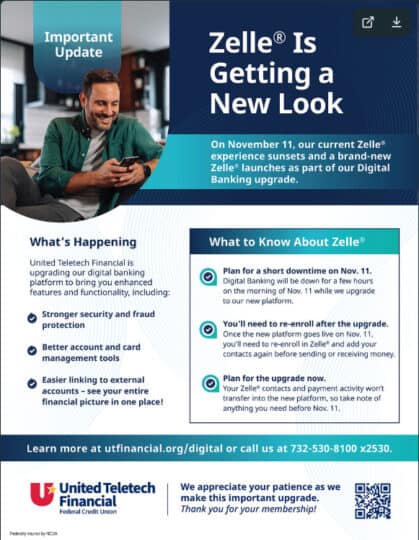
- You will need to re-register your Zelle® account after the system update
- If you have Face ID, Touch ID, fingerprint login, or another biometric login, you’ll need to re-enable it when you first access the new platform
Digital banking is changing, but the same friendly faces are still here for you! If you need support during or after the upgrade, just reach out to our team.
Fraudsters often try to take advantage during big updates at financial institutions. A reminder that we will NEVER contact you and ask for your account numbers, usernames, passwords, one-time passcodes, or Social Security number. When in doubt, hang up or delete the message, and contact us directly at 732-530-8100.
Will I need to download a new mobile banking app?
If your mobile device is set to automatically update apps, no action is required. Your app will update automatically to our new digital banking platform.
If your device is not set to automatically update apps, you will need to manually update through your device’s app store after the platform launches on November 11.
LOGGING IN
You will use your existing username and password during your first login after the upgrade. Upon login, you will be prompted to verify your identity and set up your password. Our support team will be available should you need any assistance
Yes. If you use biometric authentication, you will need to re-enable Face ID, Touch ID, fingerprint login, or other biometric login settings when accessing the new platform for the first time.
ACCOUNTS
Yes. Your accounts, balances, and transaction history will transfer to the new platform. However, some services and preferences will need to be set up again after launch (see more details below).
No. Direct deposits will continue to be processed as normal and will not be affected by the digital banking upgrade.
BILL PAY
Yes. Bill Pay payees, payment history, scheduled payments, and recurring payments will transfer to the new digital banking platform.
Validating that your contact information is up-to-date and correct in the existing platform will make the transition easier
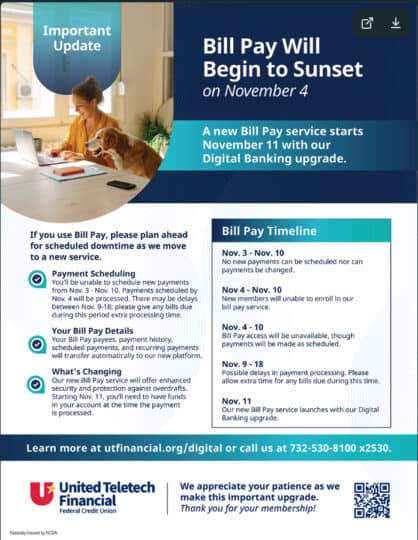
Bill Pay will be unavailable for a brief period as we transition to our new online banking platform. The current Bill Pay service will begin sunsetting on October 29 and will be replaced with a new Bill Pay experience on November 11.
To help avoid delays, please plan ahead and schedule payments early. Key dates to keep in mind:
- October 29 – November 10: You will be unable to add new payments or register for Bill Pay.
- November 4 – November 10: Bill Pay will be unavailable. Please schedule any upcoming payments before November 4 to help ensure they are processed on time.
- November 9: Electronic payments scheduled for this date will be processed one day late, on November 10.
- November 10 and later: Electronic payments will process on their normally scheduled dates.
- November 9 – November 19: Check payments scheduled during this period will be mailed on November 9 and are expected to arrive no later than November 19.
We appreciate your patience during this transition and encourage you to review any upcoming payments well in advance of these service interruptions.
Our new Bill Pay service includes enhanced security features that make sure your account has enough money before a bill payment is sent. This helps protect your account from accidental overdrafts, reduces payment errors, and ensures payments are processed reliably.
You can continue to pay bills the same way you do today. Just make sure you have enough money in your account by the date the payment is scheduled to be processed.
Yes, as long as there is enough money in your account to make the payment on the scheduled date. We still recommend scheduling payments a few days before the due date so there’s time for processing. For example, if your credit card is due on the 21st, schedule your payment for the 19th to ensure it goes through on time.
We encourage you to continue scheduling payments in advance of the due date, just as you do today. If you don’t have enough money to cover a scheduled bill payment, the payment will be canceled. If that happens, you’ll receive an email from [email protected] confirming the canceled payment. Once you have enough money in your account, you can log in and schedule the payment again.
From time to time you may receive emails from [email protected] with a subject line of Online Bill Pay Notification advising you of changes to your payment method or timing.
TRANSFERS
Scheduled and recurring internal transfers between your accounts will carry over to the new platform.
We recommend making a note of any internal transfers now, so you can easily verify that they have been transferred after the upgrade.
Your linked external accounts will not transfer after the system upgrade. You will need to connect your external accounts after the system upgrade.
ZELLE®
No, your Zelle® contacts and payment history will not transfer to our new platform. Once our new platform goes live in November, you’ll need to re-enroll in Zelle® and add your recipients again before sending or receiving money. We recommend saving a list of your contacts now, so you can quickly set up Zelle® after the new platform launches.
Zelle® may be unavailable for a brief period of time when we make the switch on November 11, but we will provide additional details and advance notice closer to launch.