



Online & Mobile Banking
Bank From The Comfort Of Your Home.
Access Your Money From Anywhere
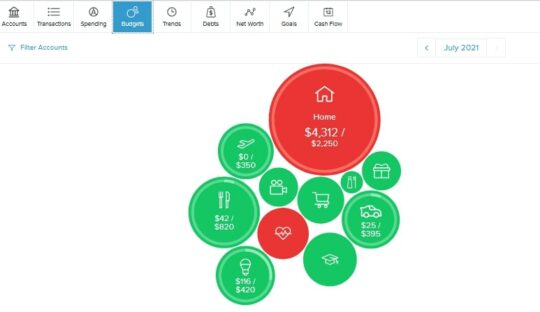
United Teletech’s online and mobile banking platforms are designed to give you access to your money no matter where you are or what device you use. We have a plethora of features that make it easy to pay bills, deposit checks, manage your finances, check balances, and transfer money. Our most recent upgrade was our new MoneyManagement tool. This new platform allows you to link outside accounts to track spending, set budgets, and payoff debt.
Take UTF with you wherever you and your mobile device go. Securely access your accounts anywhere, anytime through United Teletech Financials’ mobile apps for Android, and Apple phones. We are excited to launch the UTF’s first mobile app for Android and Apple tablets, including the Kindle Fire™.
With Our Mobile Applications, You Can:
-
Check Balance and View Transaction History
-
Transfer Funds Between Accounts
-
Pay Bills
-
Deposit Checks Remotely
E-statements
Join the thousands of United Teletech Financial members who have found the quick, easy way to access their statements online! Save paper and time by enrolling for E-statements today– it’s free! You can opt to receive an e-mail reminder each time you get a new statement, and even save or print a copy of your statement for your records.
It’s Easy to Sign Up:
-
Log in to Online Banking (at the top right of our website)
-
Hover Over the Additional Services Tab on the Main Navigation.
-
Click on e-Statements and Notices.
-
Accept the Terms of Use.
Money Management
Most families have many different accounts to track. Between all the retirement accounts, mortgages, credit cards, different savings accounts, it can be difficult to check your accounts as much as you should. Money management allows you to track your accounts all in one place. Set up budgets, and debt payoff plans, and view how you spend your money. This tool makes managing your finances and budgeting easy and convenient.
Bill Pay
Paying bills online is a convenient, secure service that will help you to better manage your finances and provide a more efficient process for paying your bills.
On both our mobile banking app and our online banking platform you can manage all your bills in one place, ensuring your will always be on time with your payments.
Get Started
-
Enroll in Online Banking
-
Download Our Mobile App
-
Manage Your Money From Your Finger Tips
All members with a United Teletech checking account have access to our online banking platform and our Mobile app.
Visit this link: https://www.utfinancialonline.org/tob/live/usp-core/app/register
Mobile Device Operating Systems
- Android devices version 8.0(Oreo) and above.
- Apple iOS devices(iPhones) version 13 and higher.
Desktop Operating Systems
- Windows 7 with Microsoft Internet Explorer versions 11 or above, Windows 8, Windows 10
- Apple OS X using Safari Versions 9 or above.
Yes. Your eligibility to use Zelle® becomes available 45 days after you enroll in online banking. Be sure to enroll in online banking as soon as your new account is set-up.
When signing the back of your check for mobile deposit your endorsement should include the following:
- Your signature
- The words “For Mobile Deposit at United Teletech Financial FCU Only”
- Date of Deposit
We will accept the abbreviation “UTF FCU.”
If you would like to request removal of your app accounts and related data, simply fill out our contact form here.
Please select “Other” and type “Remove Mobile App Account” in the comments section. One of our representatives will be in touch with you to confirm the request is valid and initiate the process.
Enroll In Online Banking & Download Our Mobile App
Deleting Your Online And Mobile Banking Access
The Google Play Store and Apple App Store have implemented a requirement for United Teletech Financial to provide our members with the ability to request the deletion of their digital/mobile banking account and any associated data. This requirement is the latest of many recent compliance updates from Google and Apple related to user privacy and data privacy.
What To Know Before Submitting a Digital Banking Deletion Request
Removing digital banking access will delete your username and password and discontinue your access to digital banking and the United Teletech Financial mobile app.
This request only removes digital banking access. It does not close your membership, close your accounts or pay off any loans. Certain records may be retained as required by law, and requests may take up to 10 business days to process.
Steps to Request Digital Banking Account Deletion
You can request digital banking account deletion in the following ways:
Complete the secure contact form here. Please select “Other” and type “Remove Mobile App Account” in the comments section. One of our representatives will be in touch with you to confirm the request is valid and initiate the process. You may also call our Member Care team at 732-530-8900 (option 3) or mail your written request to United Teletech Financial 205 Hance Avenue Tinton Falls, NJ 07724 Attn: Member Care
What Happens After Your Digital Banking Account Deletion Request
Upon execution of this request, we will delete all associated data held in our digital and internet banking system. This data will no longer be accessible or available to any party. Your loan, deposit or other accounts will remain active, and your accounts transaction history will remain in our main system history as long as your accounts are open, but all digital and mobile banking data will be deleted. You will no longer have access to features like e-statements, payment information and activity history. This includes account alerts, Bill Pay payments and payees, external transfers and scheduled or recurring transfers.
Have additional questions? We're here to help.
If you have questions about membership, our Member Care team is happy to help you. Fill out our quick contact form here or stop by one of our convenient branch locations. You can also call us at (732) 530-8100.